homepage
I’m using gethomepage/homepage. This is a very aesthetic yet simple homepage.
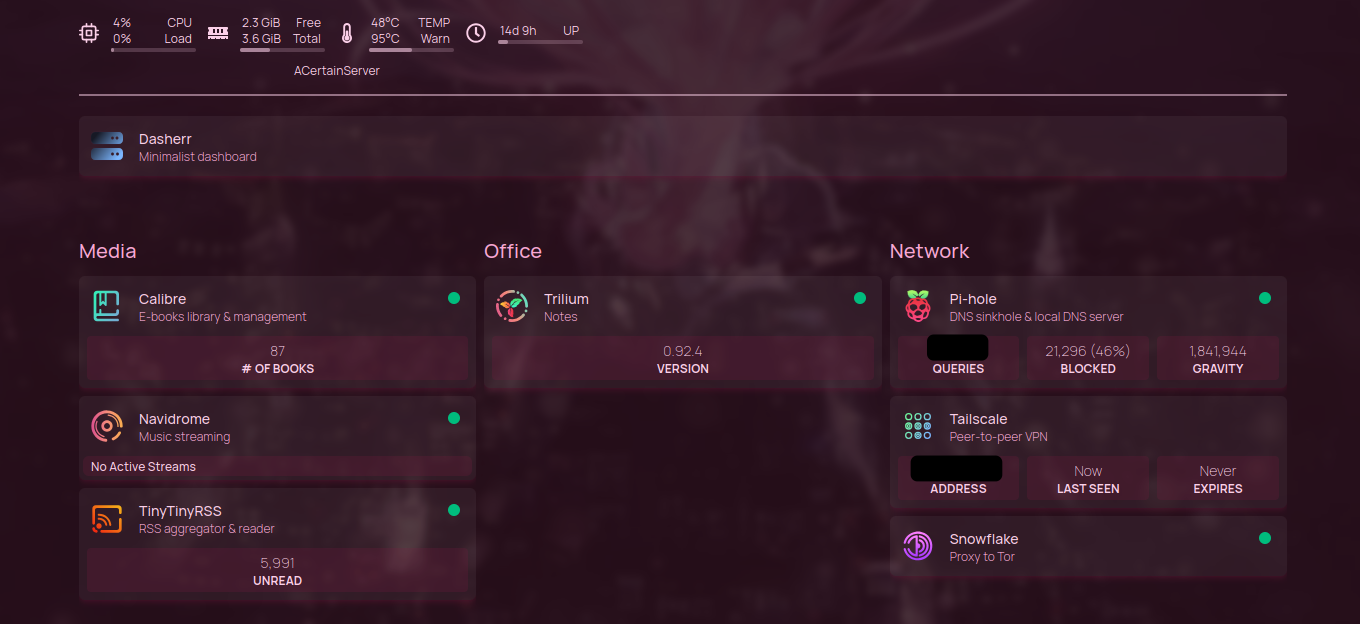
Service Widgets
I used customapi for three widgets:
- Trilium
- tt-rss
- calibre
Trilium
Trilium was the easiest to set up. It had a well-documented api (official, Trilium Rocks) and uses an app token.
        widget:
          type: customapi
          url: http://<address>:<port>/trilium/etapi/app-info
          refreshInterval: 9000000000   # random big number to avoid refreshing too often
          method: GET                   # not necessary
          headers:
            Authorization: <etapi_token>
          mappings:
            - field: appVersion
              label: Version
This simply displays the app version.
tt-rss
This one took me ages to figure out the error. I thought I was setting up my reverse proxy wrong, and I did technically. The tt-rss api endpoint requires a trailing slash, while homepage sanitises the trailing slash away. I couldn’t find out a better way to handle this, so my nginx config looks like this:
server{
    <server config>

    location /tt-rss/api {
        proxy_pass http://127.0.0.1:<port>/tt-rss/api/;
    }
}
tt-rss uses a session id (sid) to authenticate.
You can ‘login’ and get a sid using curl. Below is from tt-rss official api docs.
curl -d '{"op":"login","user":"you","password":"xxx"}' http://example.com/tt-rss/api/
This widget config shows the number of unread articles.
        widget:
          type: customapi
          url: http://<address>:<port>/tt-rss/api
          refreshInterval: 900000        # 15 min, tt-rss' refresh interval
          method: POST
          requestBody:
            sid: <sid>                   # obtained using curl
            op: getUnread
          mappings:
            - field: content.unread
              label: Unread
              format: number
calibre
Homepage has a built-in widget for calibre-web, but not one for the calibre content server. The difficulty with this is that I’m using digest authentication (because I’m not using https), which means that the authentication header requires constant update because the nonce becomes stale. The timeout for the nonce is an hour according to calibre’s source code [x].
# line 22 src/calibre/srv/auth.py
MAX_AGE_SECONDS = 3600
The API uses AJAX, defined in src/calibre/srv/ajax.py.
The following shows the numbers of books in the default Calibre library.
        widget:
          type: customapi
          url: http://<address>:<port>/calibre/ajax/search
          refreshInterval: 2629746000             # one month
          method: GET
          headers:
            Authorization: Digest username="<...> # obtained by putting the api url
                                                  # in the browser and copying the
                                                  # authorisation header
          mappings:
            - field: num_books_without_search
              label: '# of books'
To get the ‘Authorization’ header programmatically, I use a Bash script to run curl and extract the header into an .env file that will substitute the value in the service.yaml file i.e.:
headers:
  {{HOMEPAGE_FILE_CALIBRE}}
To set the substitution, the docker compose file needs to have:
   environment:
       HOMEPAGE_FILE_CALIBRE: ./config/.env
The Bash file is placed in the config folder and writes to the .env file [x, x, x, x]:
#!/bin/bash

curl -Lvso /dev/null 'http://<address>:<port>/calibre/ajax/search' --digest -u <username>:<password> 2> .tenv
sed '/Authorization/!d' .tenv | cut -c 3- > .env
The Bash script will run every hour using systemd timers [x, x]. The service/timer files are in the repo. You place them in /etc/systemd/system and run systemctl enable homepage-calibre.service (to automatically restart on boot) and systemctl start homepage-calibre.service.