Migration From OneNote To Trilium
So, I misread the page on the Trilium wiki where it detailed a method to migrate from OneNote to Trilium using Evernote Legacy. It turns out you can still download Evernote Legacy if you use the archived page. What I’m doing is probably more difficult, less efficient, for literally no gain - in fact, I’m currently facing problems that wouldn’t have arisen if I just used the Evernote method. But I had already started editing my notes so…
Firstly, I used the OneMore plug-in to export my OneNote notebook into a zip of HTML files.
Next, I inported the zip into Trilium. I needed to use the TRILIUM_NO_UPLOAD_LIMIT=1 environment variable because the zip was over 250mb [x].
When it’s imported, it will be unordered, the images will be in its own directory and there are no sub-pages. Unfortunately, the sub-pages thing cannot be fixed programmatically :/ And the order of the tabs/tab sections will also need to be fixed manually.
But the order of the pages/sub-pages and the images can be fixed using Trilium’s ETAPI. My two scripts using trilium-py are in the repo: [x]. These two scripts can be run in any order since one action is not dependent on the other. The scripts presume doing it tab by tab (NOT tab sections) - it’s easier to see if something had messed up. You could probably extend the script by adding a for loop to loop through all the tabs/ancestor notes id and file order.txt.
Also, trilium-py needs to be edited - create_branch() should not have branchId and utcDateModified as arguments (you get a PROPERTY NOT ALLOWED error) and you need to comment them out in client.py.
To mass convert the images into becoming attachments, you can use Trilium search and execute action. Here is an image:
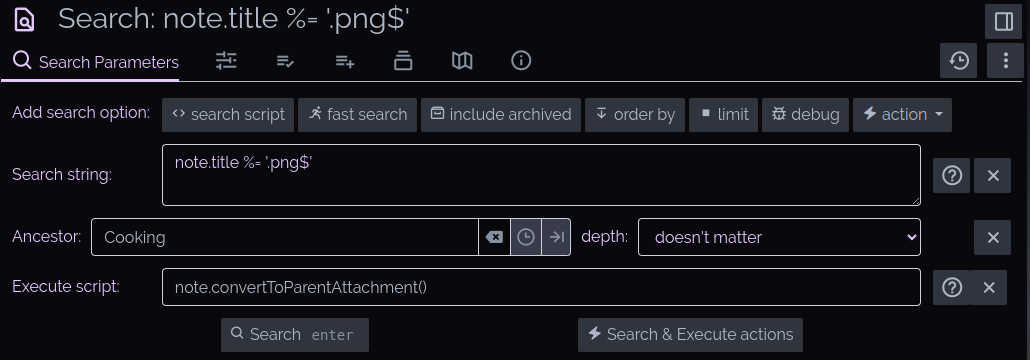
The above screenshot will search for all notes with the extension .png, within the parent note ‘Cooking’ (which is a tab on OneNote) and use note.convertToParentAttachment() to convert the image note into an attachment. The latter function is from the Trilium Backend API. A caution on using this though: Sometimes the internal link gets broken between the image and the source, and attachments get automatically deleted after a specified time if they are not linked within in the parent note. That’s why I’m doing it tab by tab - to prevent Trilium getting overwhelmed and to check that all the images are linked. If they’re not linked, I have to manually insert the image in the note by deleting the broken image and copying in the attachment link.
Styling
To emulate OneNote’s UI, I moved the left pane (and the gutter) to the right side and added classes to change the note colour in the file tree (to emulate tabs). The classes use OneNote’s tab colours; it looks weirdly bright here because usually OneNote tabs are over a white background and I’m using a dark background.