OneNote Alternatives for Linux
One of the biggest problems I encountered when moving to Linux is that there is simply no direct OneNote substitution. Unlike Word, Excel, Powerpoint, Adobe Acrobat etc., there was no Linux-compatible software capable of even reading a .one file, let alone edit.
Here is a diagram depicting my note-taking software journey:
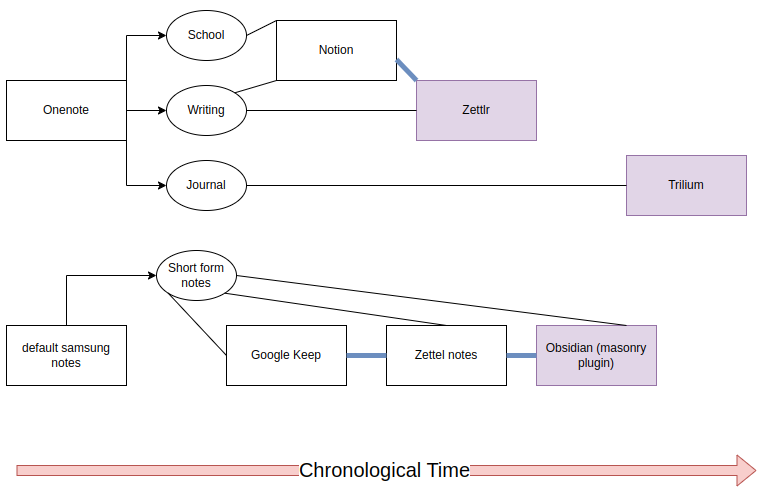
You could use OneNote on Linux, through the browser version (and the Electron wrapper) or through winapps. The browser version sucks. I did use winapps but it takes ~10gb for a minimal install of Windows and a lot of memory, so an alternative is needed.
My requirements for an alternative are:
- Infinite canvas
- Can paste screenshots
- Has a structure: notebook -> tab sections -> tabs -> page -> sub-page
- Work with one page at a time (no tabs)
- See only pages and sub-pages within a tab
- Ability to order the pages in a custom way
- Uses markdown (for future interoperability)
- Folding/collapsible headings
- Good table editing (conflicting with markdown requirement)
Notion
- Exports to markdown pretty well, apart from the page -> subpage
- This is what made me want collapsible headings
- However, the data is primarily stored on their servers, not locally
- Also, I don’t think too well of generative AI, and they started including it.
RStudio
- It has collapsible headings, ability to edit markdown, a file tree, and an in-built terminal. And it can run R code chunks.
- It’s just not really made for note-taking though
Zettlr
- Markdown
- I used it to write my undergrad thesis so I’m a little attached to it
- It has really good Zotero/citeproc integration
- Uses pandoc, so you can use a Latex template
- The project feature allows you to break your work into chapters and export it as a whole
- Renders Mermaid diagrams
- It’s not as fancy as Obsidian but it doesn’t need to be. I’m still using it for my writings.
Basket
- Infinite canvas
- Can’t paste screenshots, which is one of my biggest use cases of OneNote
Spiral
- Infinite canvas
- Has a notebook -> tab -> page structure
- Can paste screenshots into it
- Uses a json file with html
- Very promising but ultimately too little features
- my OneNote notebooks have many tab sections and sub-pages
- And there isn’t an easy way to export my stuff into it
Others
I can’t remember why I didn’t like these, but I tried them and it didn’t stick:
- Cherrytree
- Logseq
The End
In the end, it came down to two choices: Obsidian (make.md plugin) and Trilium. Here is a table comparing the two, with my requirements on the left.
By all accounts, I really should have chosen Obsidian (make.md plugin). Their canvas feature makes up for their markdown limitations, html tables can be generated from an external source and copied in, and it’s plain markdown, which is great for interoperability. They have ‘folder notes’ which is like page -> sub-page.
In contrast, Trilium uses a SQLite database, using Excalidraw has limitations on embed links, and they don’t have collapsible headings. Alas, their tables have tempted me. And workspaces are better than make.md spaces in replicating tab sections -> tabs -> pages. For make.md, you need to make a space for every ‘tab’, and the spaces can’t be grouped; they’re just listed side-by-side. Trilium’s hoisting and workspaces allows for any number of tab sections and tabs without it becoming visually cumbersome.
Basically, I’m pretty sure Trilium is definitely my OneNote alternative long-term. Next, I will be discussing my migration from OneNote to Trilium.